
PRACTICAL AI BUILDING GUIDE
How AI building tools can help your business
AI builders can help you make a first version, test a workflow and learn what to improve. Here are ten useful benefits, a sensible first project, and our fit-based recommendations for every Hype Or Handy software partner.
We checked official provider pages and documentation. These are editorial recommendations, not claims that we built or tested a production app with every tool. Features, plans and limits may change.
The short answer
An AI building tool can shorten the path from an idea to a usable draft. You still decide who the app is for, what information it handles, how access works and whether the result actually helps. The most useful first project solves one repeated problem for a small group of people.
For example, a service business could start with a simple request tracker: a customer submits a request, a staff member updates its status, and the customer sees the result. That one journey is enough to learn whether the tool fits.
Ten benefits worth using
Turn an idea into something people can try
A prompt or visual editor can produce a working first draft of a booking form, directory or tracker. Showing that draft to a real user gives you better feedback than describing the idea alone.
Spend less time on the first setup
Builders can assemble common screens, forms, navigation and data structures. You can spend more of the first week defining the job the app must do.
Let non-developers participate
An owner or operations lead can describe a workflow in plain language and revise the result. Technical review still matters when the app handles sensitive data or complex logic.
Replace scattered manual steps
A small internal tool can put requests, status updates and records in one place. Start with one repeated task, such as tracking client approvals, rather than trying to automate the whole company.
Make existing data easier to use
Data-oriented builders can turn structured records into searchable lists, dashboards and portals. This is useful when a spreadsheet already contains the information but people need different views or access.
Test demand before a larger investment
A focused prototype helps you learn whether customers will use the workflow. A faster build may reduce the cost of learning; it does not prove that anyone wants to pay.
Improve one feature at a time
You can ask for a clearer form, add a status filter or change a screen and then check the result. Small revisions make it easier to see what helped and what broke.
Use a shared example to align a team
A working draft makes conversations about fields, roles and handoffs specific. People can point to a step that fails instead of debating an abstract specification.
Preview across the devices people use
Many builders offer web or mobile preview and publishing paths. Test the actual phone and desktop journeys before assuming a layout or app-store route fits.
Learn which requirements need custom work
A small pilot reveals whether the builder can handle your permissions, integrations, reporting and export needs. That evidence helps you decide when to keep the tool and when to involve a developer.
A good first project takes five steps
- Pick one job. Write down the user, the action and the useful result in one sentence.
- Use invented sample data. Make three realistic records without uploading customer or employee information.
- Build the smallest complete flow. Connect the input, saved record and result screen before adding extras.
- Test as different people. Check what a guest, customer and staff member can see and change.
- Decide with evidence. Note completion time, mistakes, missing features, monthly cost and how you would move your data later.
What a first draft looks like
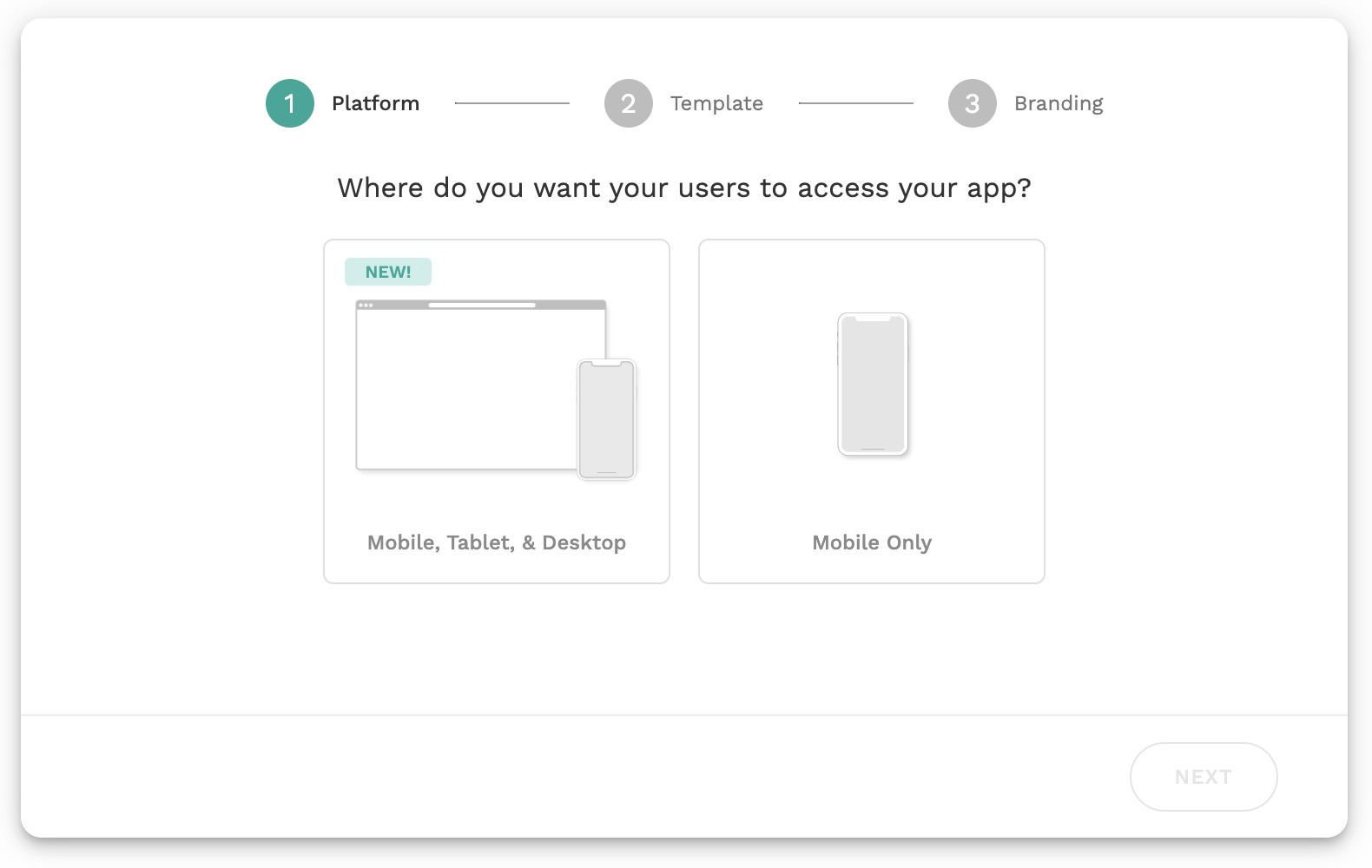
These official vendor examples come from the Hype Or Handy Affiliate Resources library. They show documented interfaces, not apps we built or tested. Use them to decide what you would inspect in your own trial.


Our AI building tool recommendations
Start with the job you need to complete. These four partners offer different ways to build an app; the best fit depends on your data, users and publishing goal. The cards use the same format as our AI tools page. For a closer side-by-side look, read our four-builder comparison.
 PROMPT-LED AI APP BUILDER
Base44
A good starting point for a focused MVP
Describe one workflow, inspect the generated draft and refine it in conversation. Base44 documents managed data, sign-in, permissions and hosting; its mobile-store route has separate plan and submission requirements.
- First test: Build the three-status project tracker from our guide. Add, change and delete a practice record, then check both user accounts.
- Before paying: Check data rules, credits, ongoing costs and what the code and data exports leave behind.
Open Base44↗ PORTALS & INTERNAL TOOLS
Softr
A good fit when the work starts with records
Start from business data and turn it into a client portal or internal tool. Softr offers native and connected data, templates, app blocks and an AI Co-Builder that can draft pages and structure.
- First test: Use invented clients and projects. Confirm each signed-in client sees only their own status and next action, including on a direct detail link.
- Before paying: Inspect field mappings, record restrictions, publishing format and the plan needed for each user role.
Open Softr↗ GUIDED BUSINESS APP BUILDER
Appy Pie
A good fit for a familiar customer-facing task
Use its guided build and ready features when the app needs to show services, share business details and collect an inquiry. The visual editor gives you a draft to inspect on a phone.
- First test: Try our local service app exercise: show three services and send a sample inquiry. Verify where the form response arrives.
- Before paying: Confirm the exact feature, platform, publishing plan and any third-party account your workflow requires.
Open Appy Pie↗ VISUAL APP BUILDER
Adalo
A good fit for a visual, data-backed app
Connect screens, lists, forms and actions to collections of app records. Its documented setup offers mobile-only or responsive layouts, so you can design for the devices your users have.
- First test: Make the resource directory from our guide with three fictional records, a detail screen and a submission form.
- Before paying: Test collection permissions separately from hidden buttons, then review publishing needs and current plans.
Open Adalo↗One related partner for business operations
We also partner with Bolt Business. It manages work rides, team spending controls and reporting; it does not build apps. Include it only if employee travel is the problem you are solving.
 COMPANY TRAVEL SOFTWARE
Bolt Business
For team rides and travel controls
A fit for companies that want employee rides and related spend in one dashboard, with group controls and exportable reports. Availability and services vary by location.
- First test: Set up a small authorized pilot group, attach its travel policy, and check one ride record with finance.
- Before signing up: Check local coverage and whether the company or employee pays; employee-pay may still need reimbursement. Review Ride Booker separately from group policies.
Open Bolt Business↗What the builder cannot decide for you
Review permissions and privacy before using real information. Test the complete customer journey, including empty states and errors. Check accessibility on the devices your users actually have. Understand usage limits, recurring charges, integrations and export options. App-store submission, if needed, has separate requirements and approval. A polished draft is useful evidence, but it is not a launch checklist by itself.
If the app manages payments, health, legal, financial or other sensitive work, get the appropriate specialist review before release. For a general business tool, begin with a narrow pilot and expand only after people can complete the core task reliably.
Official sources and review notes
We used the partner briefs, comparison and preserved vendor screenshots in the Hype Or Handy Affiliate Resources folder, then checked official provider information on September 26, 2026. Provider pages describe their own products; our fit suggestions and first-project tests are editorial guidance.